

‘I found all 25 ducks. Why is the pumpkin head missing?’
You may still have tasks left. The Halloween Duck-o-Lantern quest continues in another experience before you return to the original location and claim the reward.
The route is collect 25 ducks in Family Zone → play Duck Duck for 30 minutes and 10 games → return to Family Zone and claim. If you only collected ducks or accumulated time, check the remaining requirements separately.
The walkthrough reflects source material checked October 11, 2026. Screenshot timers and counters show the recording’s state. Read the current in-game instructions too.
| Step | Required Action |
|---|---|
| Starting experience | Family Zone |
| Quest activation | Talk to Nerba and start the Halloween quest |
| First objective | Find 25 hidden ducks |
| Second experience | Duck Duck |
| Additional objectives | Play for 30 minutes and play 10 games |
| Final claim | Return to Family Zone and use Claim |
| Ownership check | Find Duck-o-Lantern in inventory or the avatar editor |
1. Start the Quest and Find 25 Ducks in Family Zone
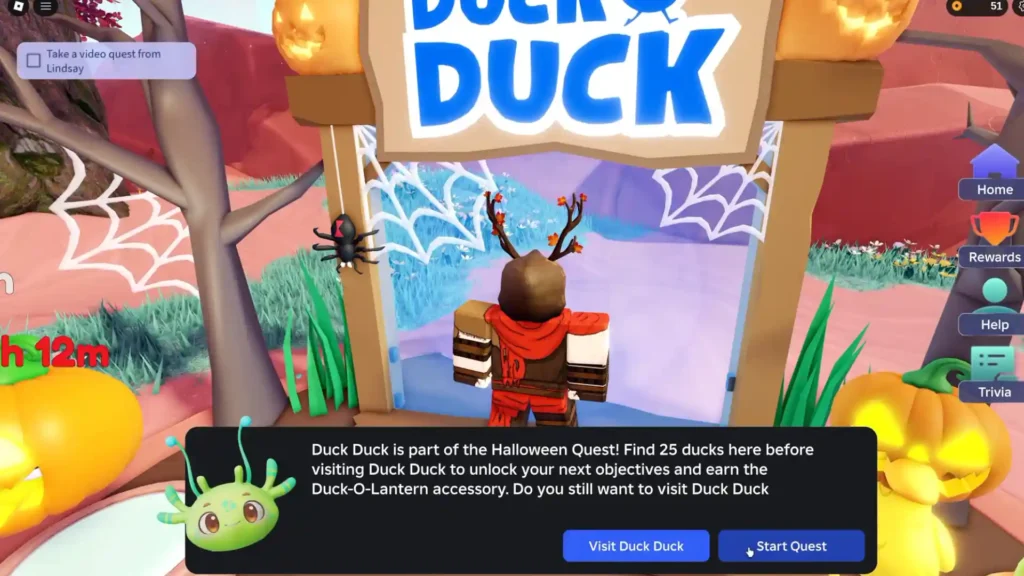
Activate the quest before searching, then watch the collection counter as you explore.
Find Family Zone and check that its creator is Roblox Education. Search order can change, so compare both identifiers.
Locate the alien NPC Nerba and talk to them. Start the Halloween quest and confirm it is active before hunting the 25 ducks around the map.
Found a Duck but the Counter Did Not Move?
The collectible ducks wear different costumes. Looking only for one appearance can make you miss nearby targets.
After interacting, check that the quest counter actually increased. A duck-shaped decoration is not necessarily a registered collectible.
Search one direction through defined areas and check the counter after each pickup. That narrows the unsearched space when only a few remain.
At 25, read the next objective and follow the route into Duck Duck. Completing the collection does not mean the final item is already owned.
2. Complete Both Duck Duck Requirements
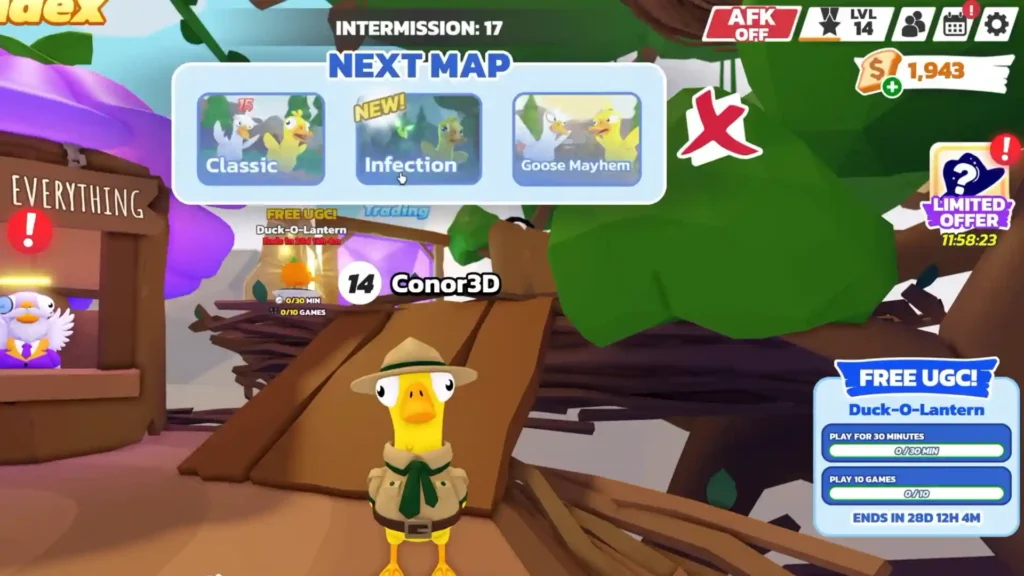
The FREE UGC panel tracks time and games separately.
You need both 30 minutes of play and 10 games. Check each entry:
- PLAY FOR 30 MINUTES: the time requirement
- PLAY 10 GAMES: the game-count requirement
Thirty minutes online does not complete the route if the game counter is short. Review both indicators.
Duck Duck has geese pursuing ducks as players try to avoid getting caught. As rounds progress, check which event objectives have registered.
Do I Need Ten Wins?
The displayed wording is play 10 games, not win ten. Watch the event’s game counter rather than assuming victory is required.
Can I Just Leave the Game Open?
Do not assume that completes everything. There is a games requirement alongside time. If you step away, recheck both objectives afterward.
Does the Whole Quest Take Exactly 30 Minutes?
Thirty minutes is the Duck Duck stage’s time requirement. Finding the ducks, traveling between experiences, and claiming the item take additional time.
Total completion can exceed half an hour and varies with search speed and round progress. Allow for the full route.
3. Return to Family Zone and Use Claim
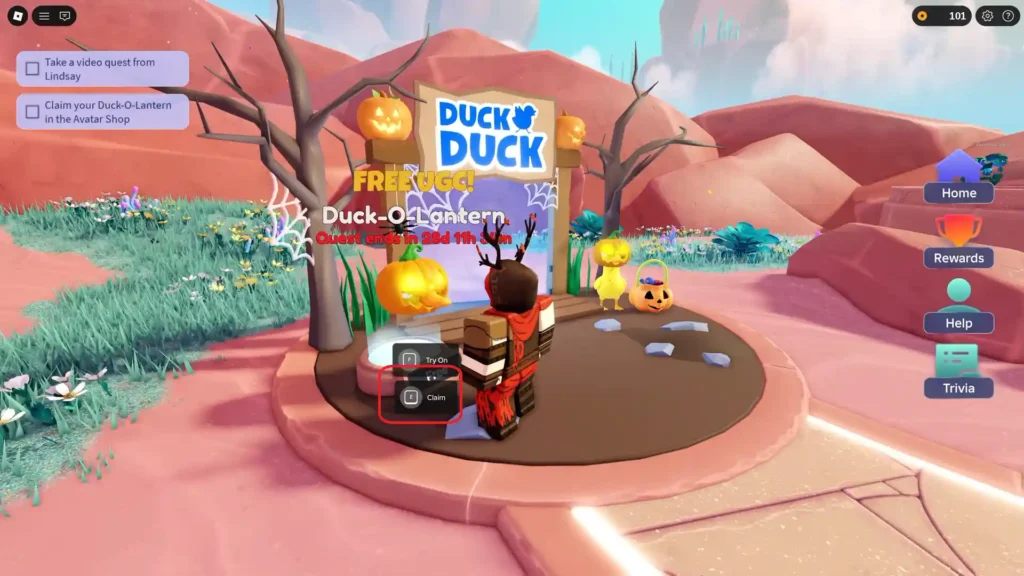
After completing both tasks, return and interact with the reward’s Claim prompt.
Follow the instruction to return to Family Zone, then find the reward area near the Duck Duck entrance.
Complete the interaction, then open your Roblox inventory or avatar editor and check that the item was granted.
Complete tasks → return → claim → verify inventory. The last two steps establish whether you actually received the reward.
If the Item Is Missing, Check Your Last Completed Step
| Current State | Next Check |
|---|---|
| All 25 ducks found | Have you completed the Duck Duck tasks too? |
| Thirty minutes played | Is the 10-game objective complete? |
| Both Duck Duck tasks complete | Have you returned to Family Zone? |
| Back at the reward area | Did you complete the Claim interaction? |
| Claim pressed | Have you checked inventory and the avatar editor? |
What About the Conflicting End Dates?
Read this carefully: Family Zone’s official description asks players to finish by November 4. The original guide also records an item description saying before November 8. Those are different dates.
Do not assume the later date extends the quest. Plan to finish and claim before November 4, and check the current countdown and announcements. No exact local cutoff is established here from either date alone.
The route depends on 25 ducks, 30 minutes, 10 games, and Claim after returning.
Do not leave after the duck hunt or stop at the timer. Finish by checking that Duck-o-Lantern is in your inventory.
Regional and version notes
The detailed route follows the original October 11 materials and screenshots. The checked Family Zone description says finish quests by November 4. The later November 8 item-description date is recorded by the source, not a verified extension of that quest deadline. Follow the earlier date and the live countdown; no precise North American cutoff is inferred from a date without a time. Some illustrations are retained from the Korean edition and may include Korean labels. Use the English article text for instructions.
Localization sources checked October 23, 2026 (Korea time):